
The new Tell Me bot: two-way anonymous chats, your question for everyone, and the My messages app

In this update
- Your link is ready from the first message
- Your question for everyone
- What people see when they open your link
- An anonymous animal for each sender
- Reply to them, and they reply to you
- The messages you send to others
- A picture for your story
- Share your link in any chat
- Stronger protection
- The My messages app
- A few more things
We rebuilt the Tell Me bot from scratch. Tell Me gives every user a private link, and anyone who opens it can write to them without showing their name. Messages are now a full two-way chat, each sender gets a fixed animal that sets them apart, and users get the My messages app with all their messages in one place. Old links work as before, and your bot gets all the new features automatically. Here is what changed:
What's new
- Your link is ready from the first message, with your numbers for the week
- Your question for everyone: anyone who opens your link sees it before they write
- An anonymous animal for each sender: you know when the same person comes back, but not who they are
- Two-way chat: you reply to the message, and the sender replies to you while staying anonymous
- The messages you send to others in one place, with their replies
- A story picture with your question and link, plus the message and your reply
- Share your link in any chat, with words you write yourself
- Stronger protection: blocking the person never finds out about, reports, a profanity filter, and turning off incoming messages
- The My messages app: sealed messages you open with a tap, and a chat with each sender
Your link is ready from the first message
There's no extra step to create your link anymore. On the first /start, the bot sends your link right away, along with your numbers for the last 7 days: how many messages you got, how many people opened your link, and how many wrote to you. And every link people shared before still works.
Here's your link. Share it and people can write you without you knowing who they are:
t.me/SarhniBot?start=Zcqmpdl
❓ Your question for everyone: What was your first impression of me?
📊 This week: 23 messages, 140 opened your link, 17 people wrote to you
This message takes you everywhere: your messages, your question, settings and the app. Every menu opens in the same message, so the chat doesn't fill up. And the /inbox command opens your messages directly.
Your question for everyone
Pick a question that anyone who opens your link sees before they write, so they know what to write to you. Every user starts with a ready-made question and can change it anytime.
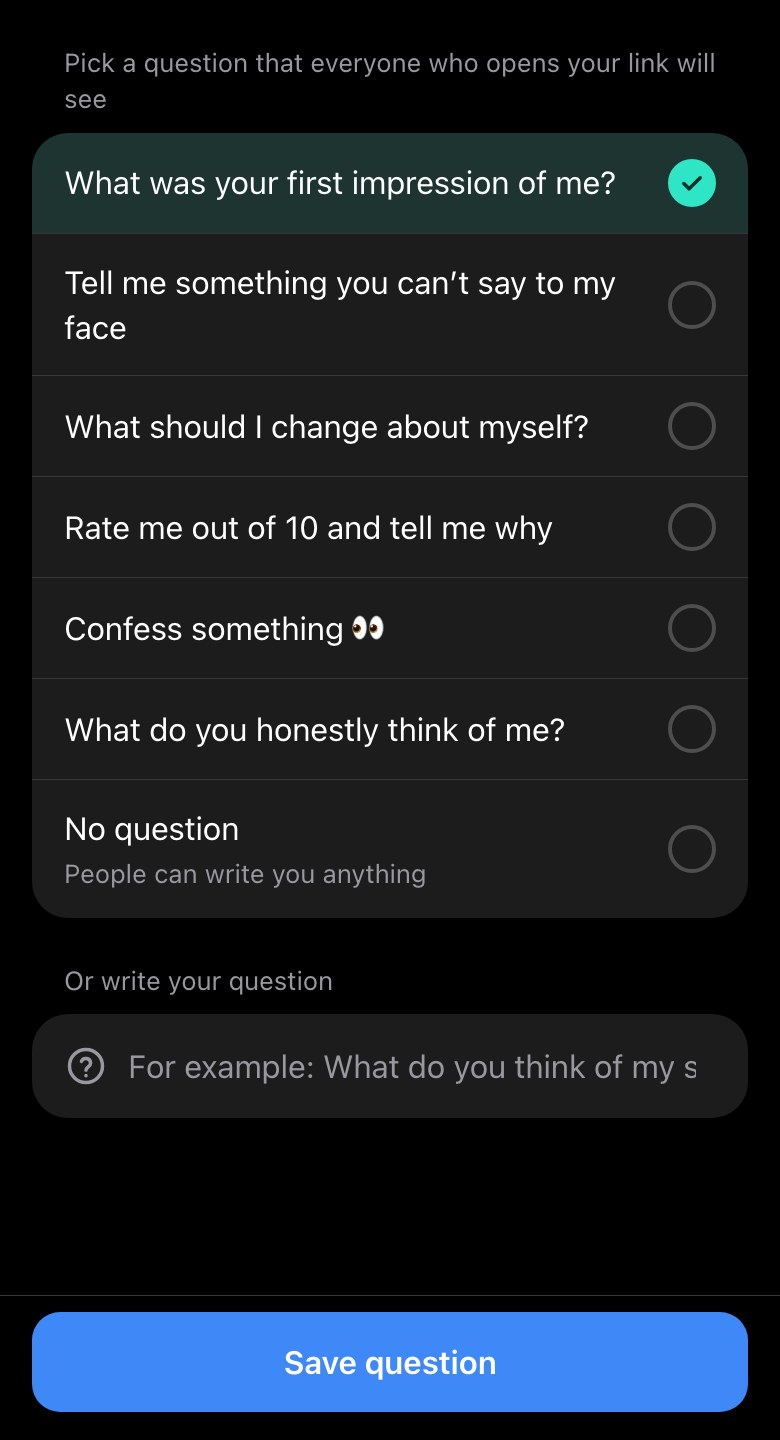
- 6 ready-made questions, like “What was your first impression of me?” and “Rate me out of 10 and tell me why”
- Your own question of up to 80 characters
- No question, so people can write you anything
Your question also shows up with your link when you share it, on the story picture, and in the alert for each person's first message.
How to change your question
- Tap ❓ Change the question in the start message
- Pick a question from the list, or tap ✍️ Write your question and type it
- Or tap 🚫 No question
What people see when they open your link
Whoever opens the link sees your name and your question, plus a message that tells them you won't know who they are. They can write text or send a photo, video, voice message or sticker. After sending, they get a button to write another message and a button to make their own link, so the bot spreads from friend to friend.
Omar asks you:
What was your first impression of me?
🔒 They won't know who you are, and we won't tell.
Write your message here: text, photo or voice message 👇
If they reply, you'll get the answer here.
- Writing stays open for 15 minutes after their last message, so they can send several messages in a row
- A text message can be up to 3,500 characters
- If you turn off receiving messages, anyone who opens your link sees that you're not taking messages right now
An anonymous animal for each sender
Everyone who writes to you gets a fixed name from 24 animals, like 🦊 Anonymous Fox and 🐼 Anonymous Panda. If the same person comes back and writes again, they show up as the same animal, so you know it's them without knowing who they are.
The first time I saw you I thought you were super serious, then I found out you're the nicest one in the group 😂
❓ Answering your question: What was your first impression of me?
Under every message there are buttons to reply, make a story, block and report. If the same person writes to you more than once, a 💬 Full chat button appears so you can see all your messages together. And the alert comes in your language, even if the sender uses the bot in another language.
Reply to them, and they reply to you
Tap ↩️ Reply under the message, or swipe the message to reply like in any chat, then type your reply or send a photo or voice message. Your reply reaches the sender from the bot, together with the message you replied to. They answer you with the ↩️ Reply back button while still anonymous, and it becomes a full conversation.
The first time I saw you I thought you were super serious, then I found out you're the nicest one in the group 😂
Thanks ❤️ Who are you?
In 📬 My messages you'll find all your chats, 4 per page, with new ones marked 🔵. Tap 🆕 Only new to see only what you haven't read.
How to reply
- Tap ↩️ Reply under the message, or swipe it to reply
- Type your reply, or send a photo or voice message
- They get your reply and can reply back
The messages you send to others
If you write to someone through their link, the chat shows up under 📤 Sent messages in the start message, with the number of new replies. You read their replies and keep writing to them with ✍️ Write to them, and they don't know who you are, even when they reply.
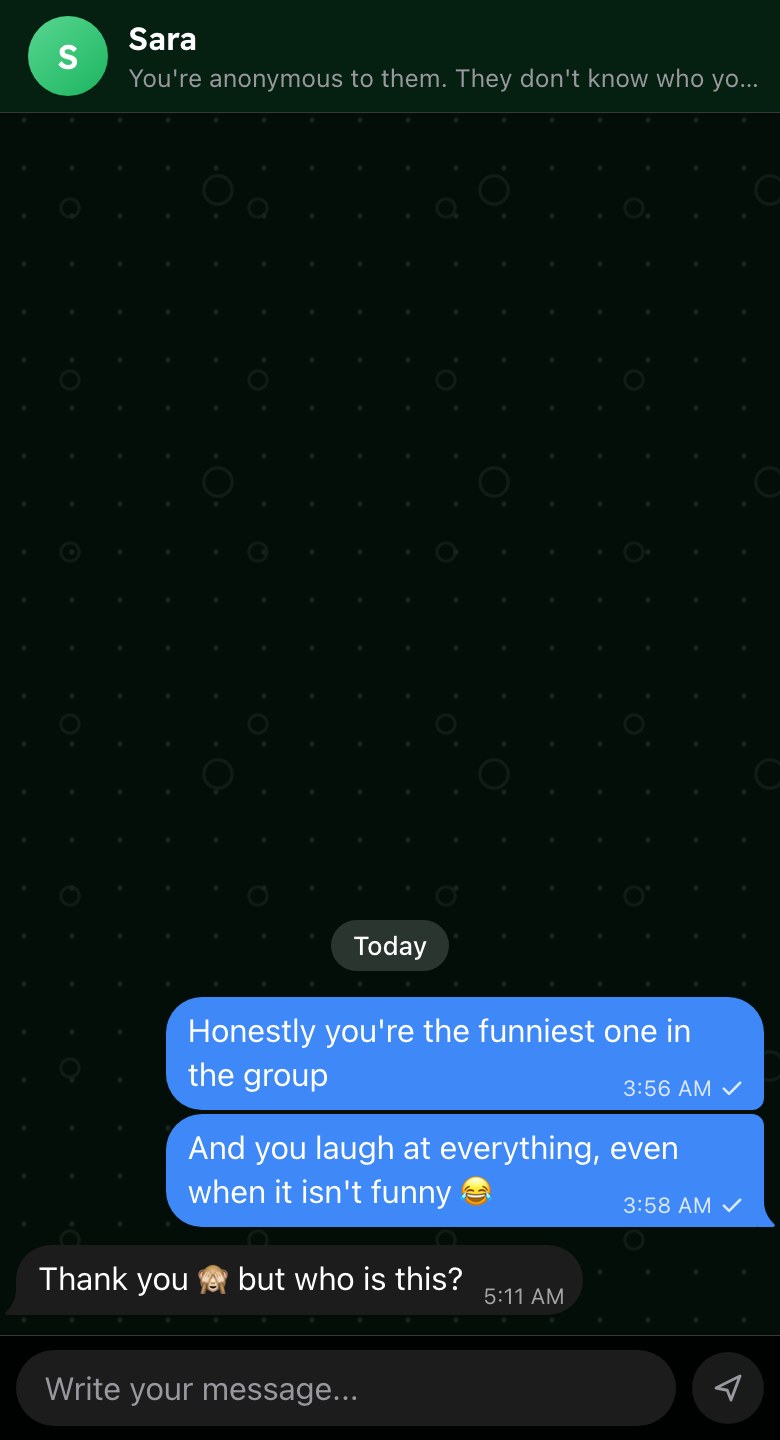
This button appears once you've written to your first person.
A picture for your story
Tap 📸 Story photo and the bot sends you a ready picture with your question and link, or opens the app so you can make it there. With the 📸 Story button under any message, the picture also includes the message and your reply. Post it to your story, and anyone who sees it knows where to write to you. The picture shows nothing about the sender.
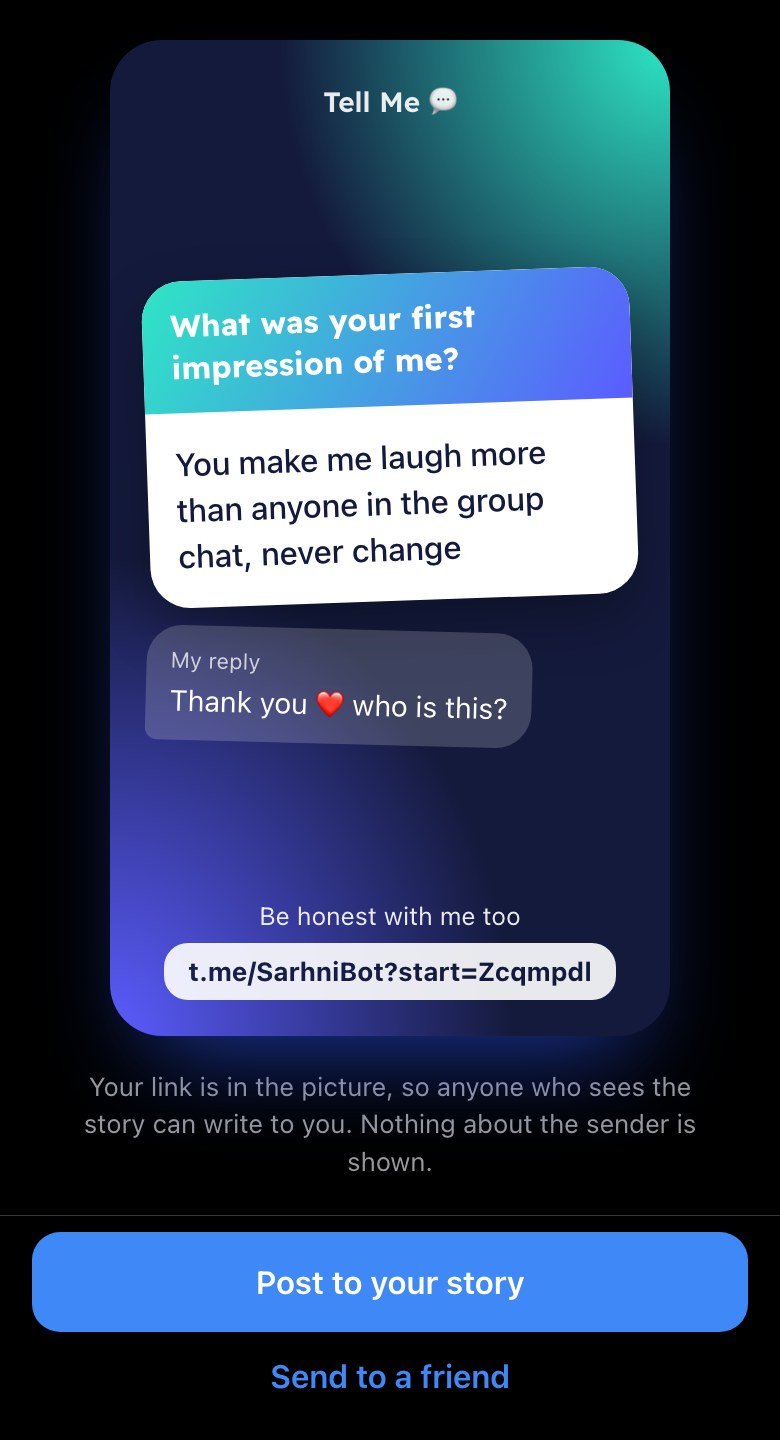
In the app, you post the picture straight to your story with the Post to your story button. For Telegram Premium subscribers, your link is added to the story itself, so viewers can open it with a tap.
Share your link in any chat
Tap 📤 Share your link and pick a chat, and the bot sends a card with your question and a ✍️ Write to me here button that opens your link. If you type something after the bot's username, like “Be honest with me, friends”, a ✍️ Send what you wrote option appears that sends your own words with the same button.
What was your first impression of me?
Inline mode turns on by itself when you open the control panel, so you don't need BotFather.
Stronger protection
Under every message there's a 🚫 Block button. A blocked person doesn't know they're blocked: they see their message as sent, but it never reaches you. The ⚠️ Report button blocks them too and sends us a report about their message.
Tap any option to turn it on or off.
- Receive messages: turn it off whenever you like, and anyone who opens your link sees that you're not taking messages right now
- Photos and voice messages: turn this off to get text messages only
- Profanity filter: on from the start. A message with swear words doesn't reach you, and the bot asks the sender to edit it
- Blocked: everyone you've blocked. Tap anyone to unblock them
- One person can't send you more than 20 messages in 10 minutes
How to open settings
- Tap ⚙️ Settings in the start message
- Tap any option to turn it on or off
- Tap 🚫 Blocked to see who you've blocked
The My messages app
Open the app with the 📱 App button in the start message, or with the 📬 My messages button next to the message field in the bot chat. At the top is a card with your question and link, below it the buttons to share, make a story and change your question, and your numbers for the week.
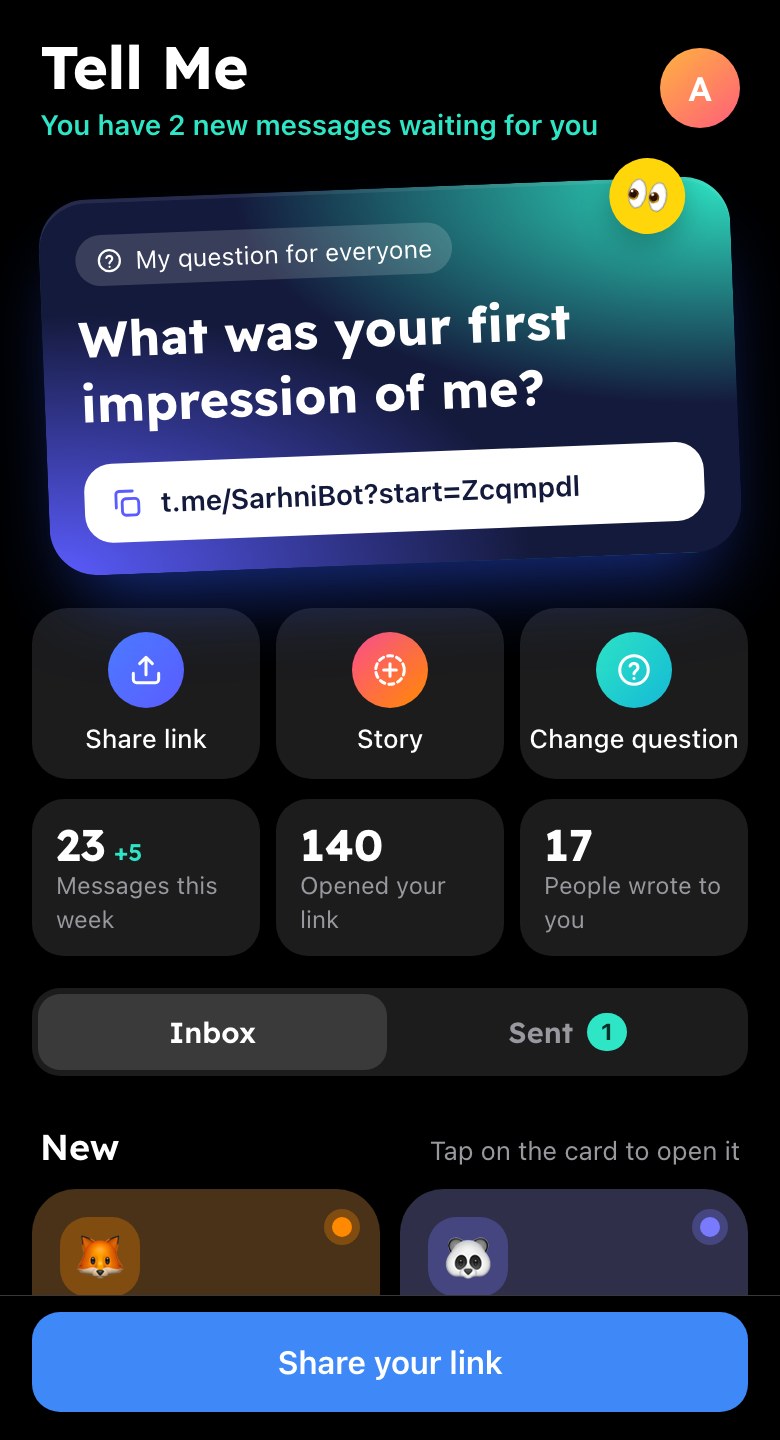
New messages arrive as sealed cards: tap a card to open it. Each sender has a page that looks like a Telegram chat, with their messages and your replies sorted by day, and you reply right from there.
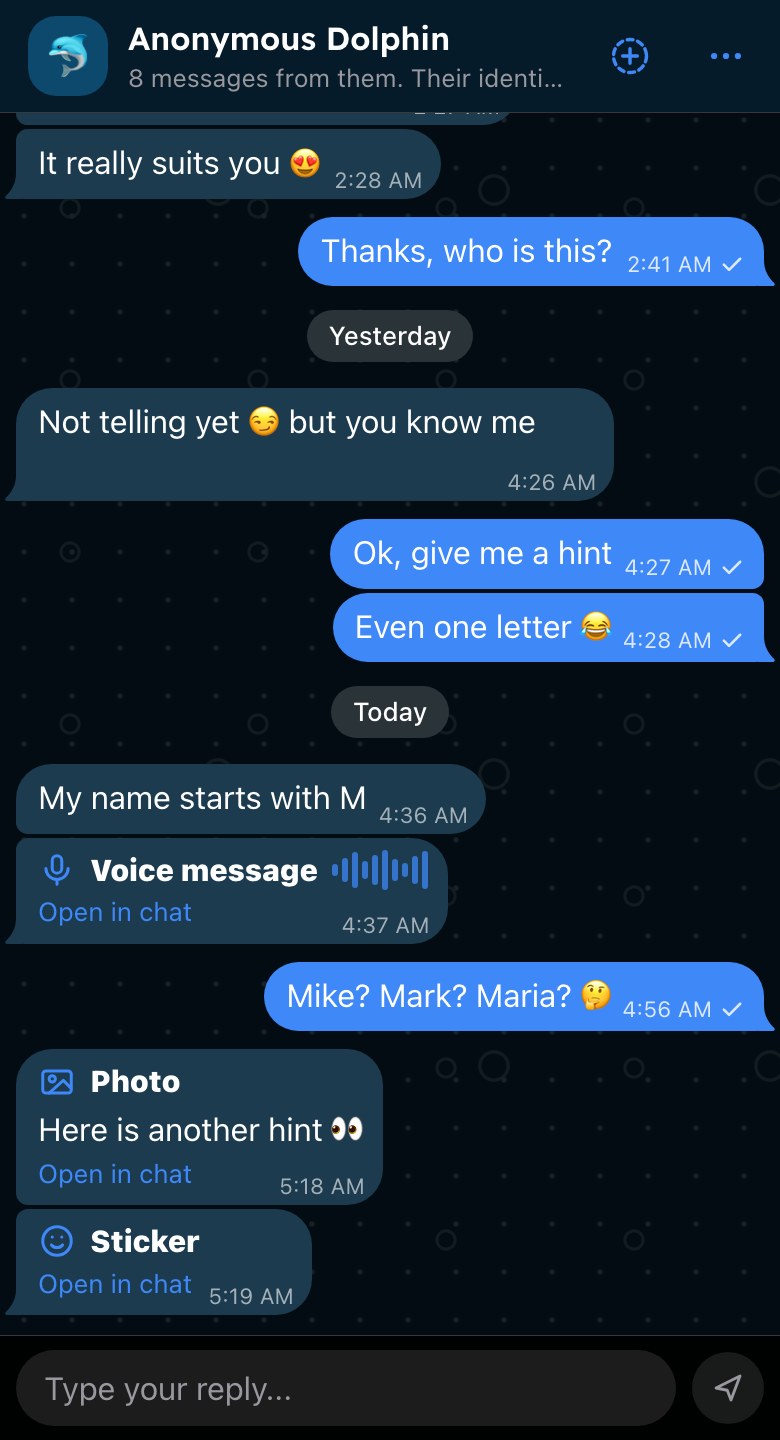
- Inbox and Sent: the messages you got, and the chats you started with others
- From the chat menu: the story picture, block and report
- Settings and protection: the same settings as in the bot, plus the blocked list
A few more things
- Forwarding doesn't reveal the sender: the “Forward messages” option in the control panel doesn't work in Tell Me, so the writer's identity never shows
- What started in the old bot carries on: you can reply to old alerts by swiping them, and anyone you blocked before stays blocked
- Block by reply: reply to a message with the word block or /ban, and use /unban to unblock
- Chats are kept for 180 days after their last message
Getting started
- Create a Tell Me bot for free with Echo Maker
- Open the bot and grab your link from the start message
- Tap 📤 Share your link, or post the story picture
Try the new Tell Me now, and tell us what you think.