
The new Whisper bot: new whisper types, whispering by reply in groups, and the My whispers app

In this update
We rebuilt the Whisper bot from scratch. A whisper is a secret message that everyone in the group can see, but only the person you choose can read. Whispers now come in new types, the bot tells you who read your whisper, and you get the My whispers app with all your whispers in one place. Your old bot keeps working as before, and it gets all the new features automatically. Here is what changed:
What's new
- New types: a whisper for one person or several, for everyone, for the first person who opens it, or for the first 2, 3 or 5
- Whispers that delete after reading, expire after an hour, or a surprise that opens later
- See who read your whisper: a private message, reaction buttons, and a button to reply with a whisper
- Whisper by reply in groups: reply to the person's message and write your whisper in private, even in a group without the bot
- Photos, voice messages and long whispers that open in the bot chat
- The My whispers app: all your whispers, who read them, whisper friends, and sending and unsending from the app
- A weekly summary as a picture ready for your story
- Block people who bother you from opening your whispers for the first person
- For bot owners: customize the whisper buttons and texts
New whisper types
You write the whisper in any chat after the bot's username, then choose its type from the list that appears above the text field. If you write someone's username at the end or the start of the whisper, the whisper is for them alone. If you write more than one username at the end, it is for all of them, and the bot crosses out the name of everyone who reads it.
only they can see it
If you don't write any username, you choose from the list: a whisper for everyone, for the first person who opens it, or for the first 2, 3 or 5 people. On a whisper for everyone, the button shows how many people opened it. The same list also shows the last 8 people you whispered to, so you don't need to type their usernames again.
How to send a whisper
- Tap Send whisper in the bot and choose the chat, or type the bot's username in any chat
- Write the whisper, then the person's username at the end
- Choose the whisper type from the list
Whispers that delete after reading or open later
A whisper for one person has three new types in the same list:
- Delete after reading: after the first read, the whisper text is wiped, and the message changes to say it was deleted after reading
- Expire after an hour: after an hour, nobody can open it, not even you
- Surprise: it opens after an hour, or the next day at the same time, and its button shows the time left. Until then, nobody but you can open it. A whisper for everyone can be a surprise too
See who read your whisper
When the person opens your whisper, the bot sends you a private message with their name and username. With a whisper for everyone, you get an alert for each person who opens it, and you can turn this off in Settings. You get these messages if you have started a chat with the bot.
After the whisper is read, four reaction buttons appear under it, so the sender knows what the reader thinks. There is also a Reply with a whisper button that writes a new whisper straight back to the sender.
Reaction buttons are on from the start. If you don't want them, turn them off in Settings, then Reactions.
Whisper by reply in groups
You no longer need to write the person's username, or even add the bot to the group. In any group, reply to the person's message, type the bot's username and send it. The bot replies with a card that has a Write the whisper button. You write your whisper in private, as text, a photo, a video or a voice message, and it arrives in the group where only that person can read it.
Press the button and write your whisper in private, only they will receive it here.
- If the bot is an admin in the group, just reply with the word whisper (or hms), and the bot deletes the word to keep the group clean. If the bot is a member without admin rights, use the /hms command in reply to the message
- Only the person who asked for the whisper can use the write button, and it works for 15 minutes
How to do it
- In any group, reply to the person's message
- Type the bot's username and send it, or the word whisper if the bot is an admin there
- Tap Write the whisper and write your whisper in private
Photos, voice messages and long whispers
If a whisper is longer than 190 characters, or it is a photo, a voice message or a file, the person opens it in the bot chat. They get a copy that can't be forwarded or saved, and a whisper that deletes after reading is removed from their chat after a minute.
You can also forward someone's message to the bot, and it offers to send them a whisper.
The My whispers app
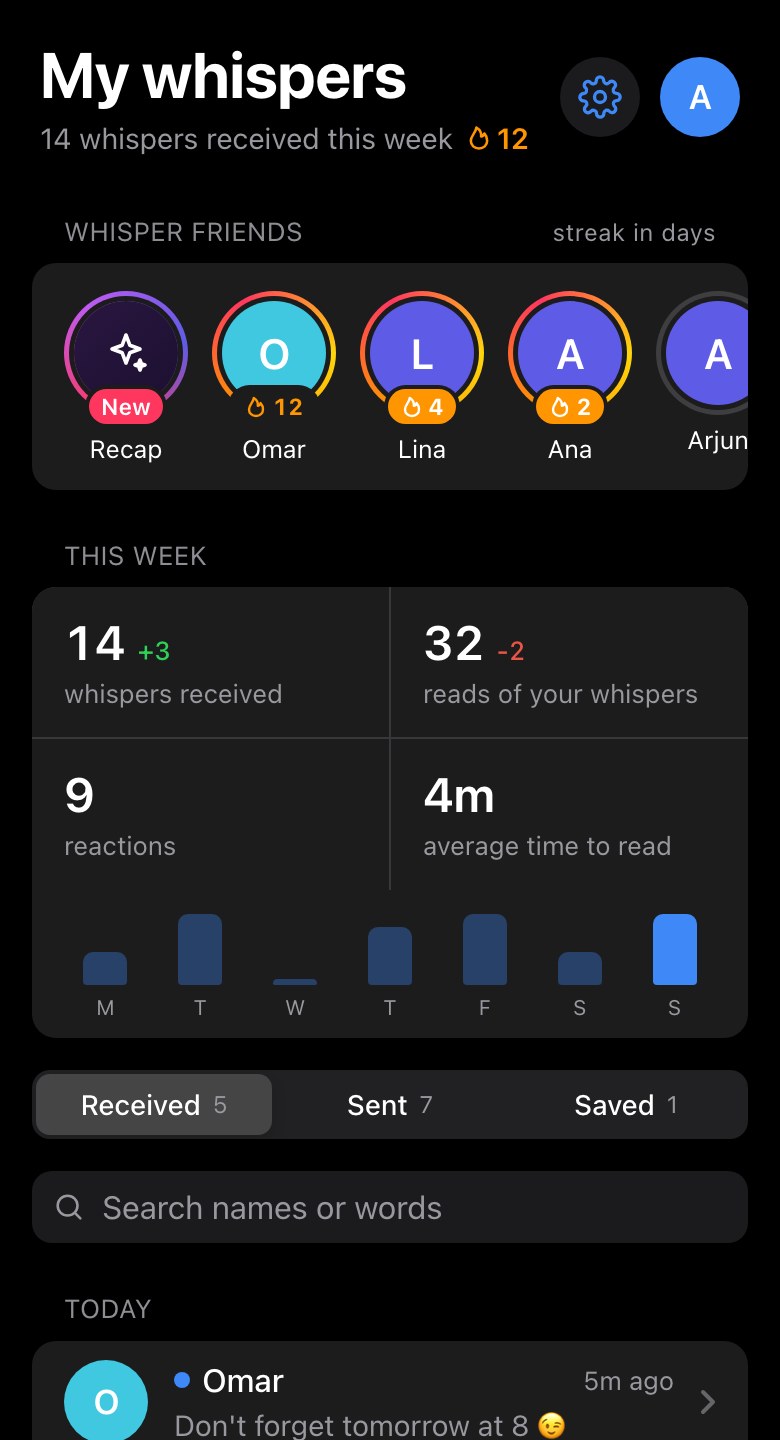
Open My whispers from the start message, or from the menu button next to the text field in the bot chat. It has the whispers you opened and the whispers you sent, sorted by day, with search by name or by words. At the top are your week's numbers: how many whispers you got, how many times your whispers were read, the average reading time, and a chart of the last 7 days.
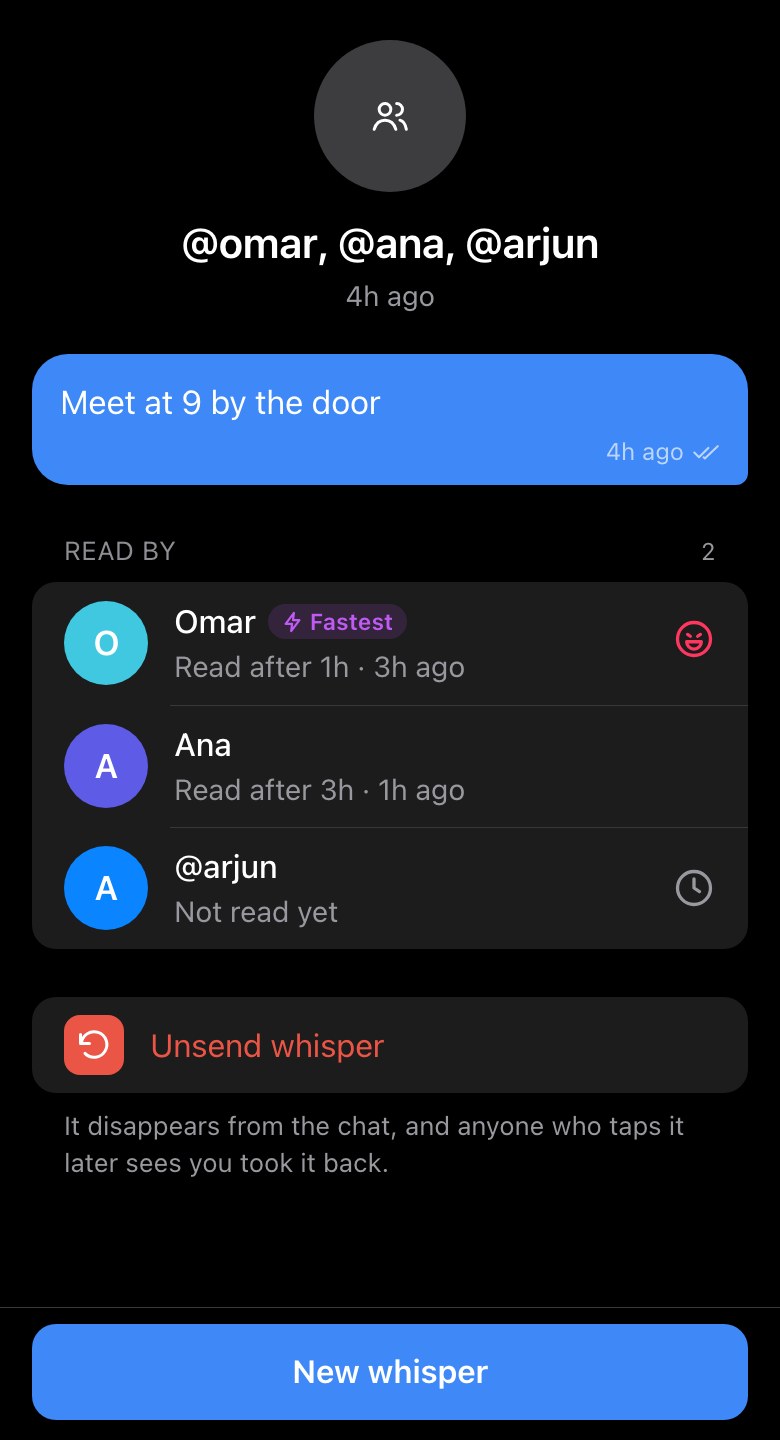
On the page of each whisper you sent, you see who read it and how long it took them, who was the fastest, and who hasn't read it yet.
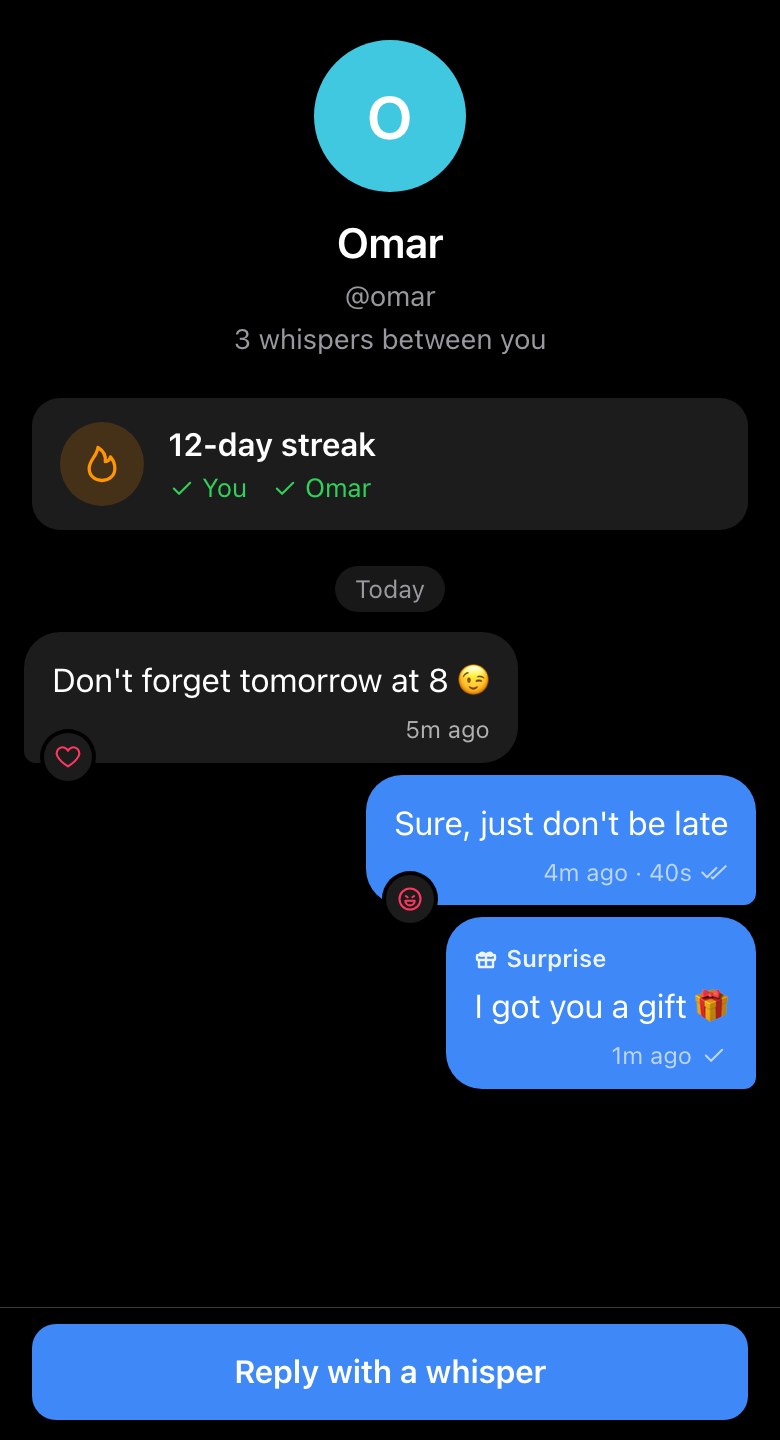
Whisper friends are the people you swap whispers with. Each friend has a streak of days that grows every day you both open a whisper from each other. Tap a friend to see your whispers as a chat.
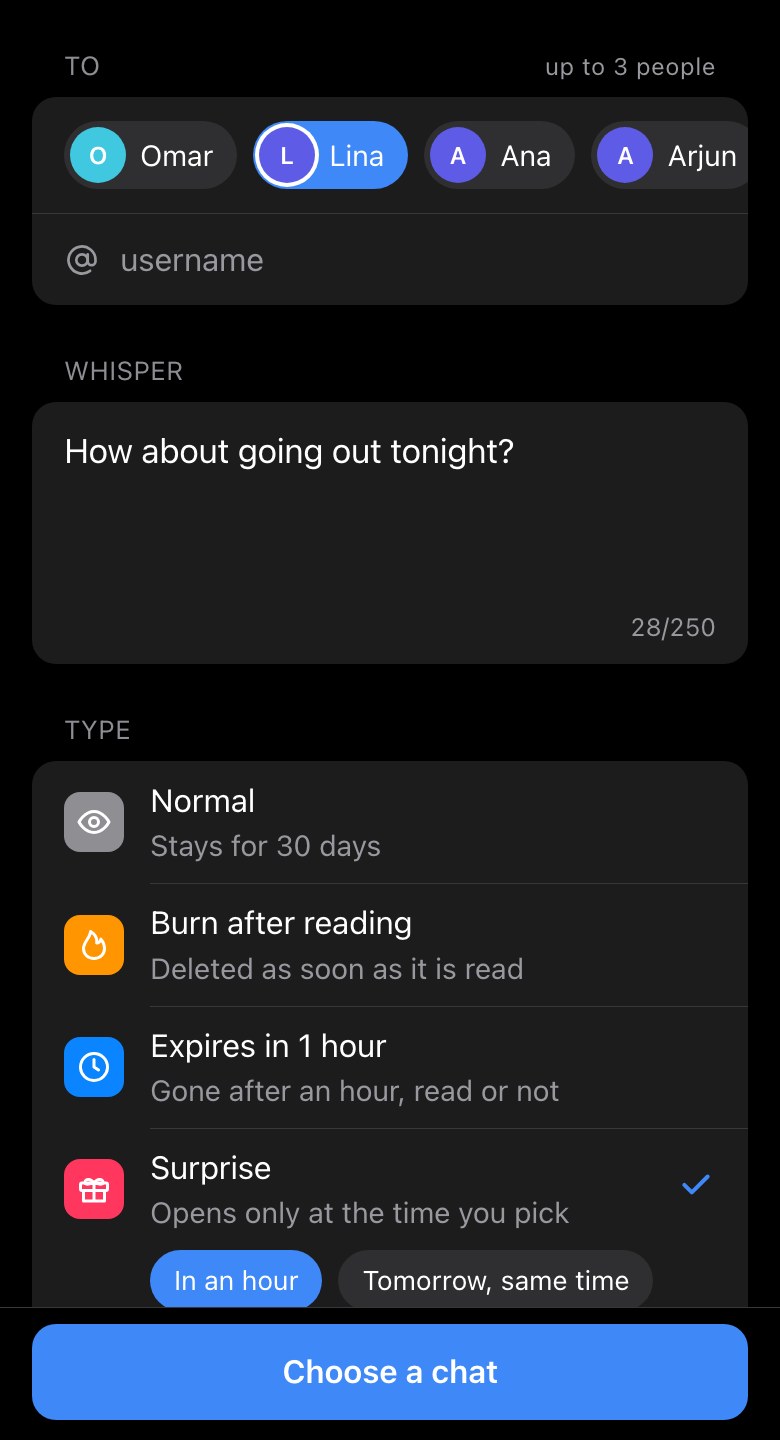
You can also send from the app: tap New whisper, pick up to 3 people, everyone, or the first person who opens it, write up to 250 characters, choose the type, then tap Choose a chat.
- Unsend: on the page of a whisper you sent, tap Unsend whisper. After that nobody can read it, and anyone who taps it sees that the sender took it back
- Saved: tap Save it on a whisper you got, and it stays with you even after it expires. It is saved in your Telegram account, and nobody else can see it
- Settings: the same settings as in the bot, from the settings button at the top of the app
Your weekly summary
Every week, the bot makes you a picture with how many whispers you got, who whispered to you the most, your longest streak and your fastest reader. The whisper texts don't appear in it. In the app, you post it to your story directly with Share to story. In the bot, you get the picture from Your weekly summary.
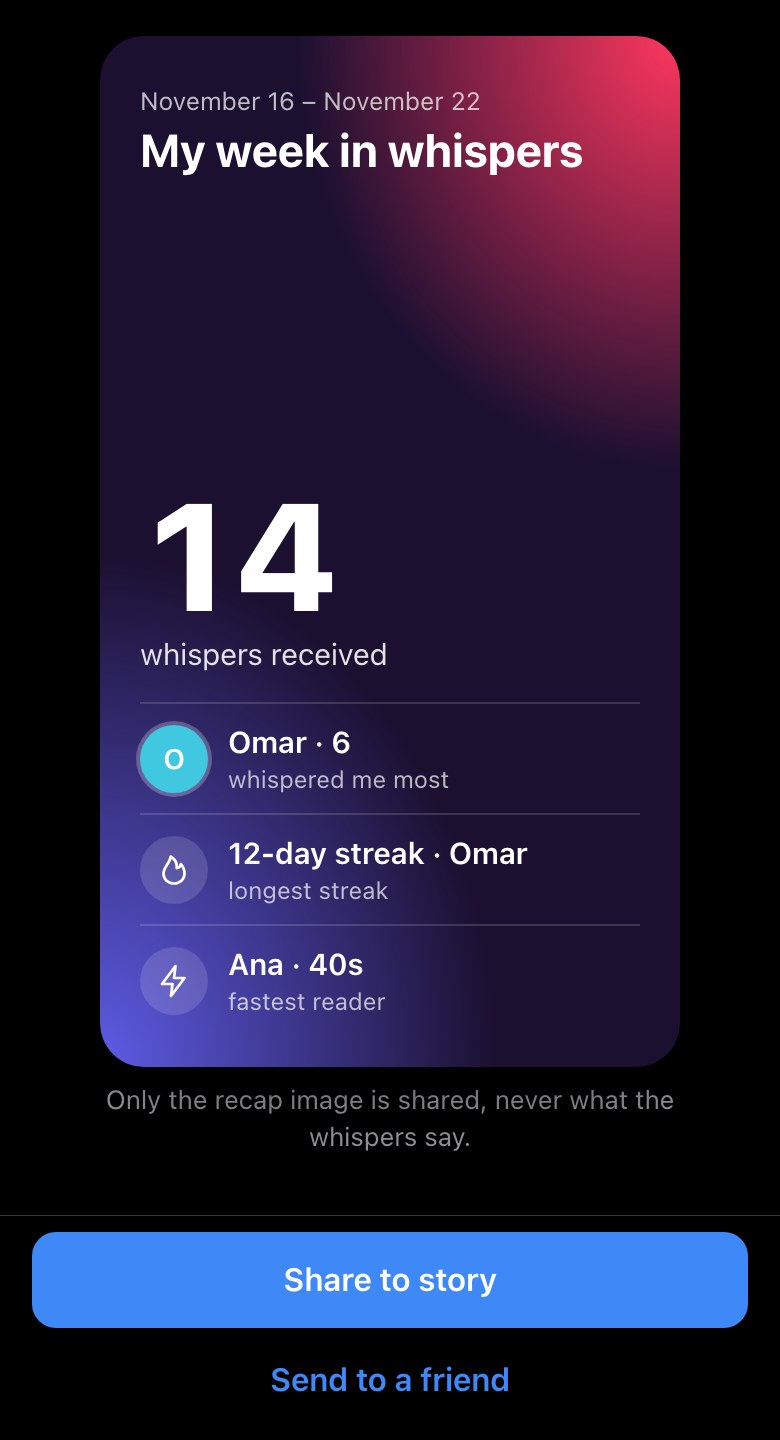
The summary appears when the whispers you got and the reads of your whispers add up to 3 or more in a week.
Block people from your whispers for the first person
A whisper for the first person who opens it may be opened by someone you don't want. Under the alert that they read it, tap Ban from my whispers for the first person, and they can't open your whispers for the first person after that. This also covers whispers for the first 2, 3 or 5.
- username: @sam
- name: (Sam)
- id: 5839201746
- Whisper:
Meet at 9 by the door
You find blocked people and unblock them in Settings, then Blocked, or in the app settings.
For bot owners: customize the whisper
In the control panel, tap Customize whisper. You can change the names and colors of the buttons, add a Premium emoji to them, and write the whisper texts yourself. The text you write shows for all users in all languages.
Choose what you want to change in your whisper bot. The edit shows to all users in all languages, and ✏️ means you edited it.
- Buttons: a name up to 30 characters, blue, green, red or no color, and a Premium emoji. For reaction buttons, only the color and emoji change
- Texts: up to 1000 characters with formatting, and the “Not for you” text up to 150 characters
- Inline mode turns on by itself when you open the control panel, so you don't need BotFather
And also
- A 4-step guide for new users on their first /start, which comes back any time with the /help command
- A clearer start message with clear buttons: Send whisper, My whispers, Your weekly summary, Settings
- A welcome in the group that explains how to whisper when the bot is added
- Whispers stay for 30 days, then expire
How to start
- Create a Whisper bot for free in Echo Maker
- Open the bot and tap Send whisper
- In any group, reply to the person's message and type the bot's username
Try the new Whisper bot now, and tell us what you think.